
BRTA DNP & DRC Checker
BRTA ICTAuto & Vehicles
3.98.00 Reviews
- Version
- 1.0.8
- Installs
- 500.00K
- Age Rating
- Everyone
Screenshots
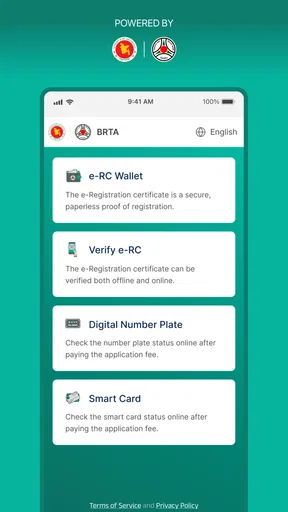
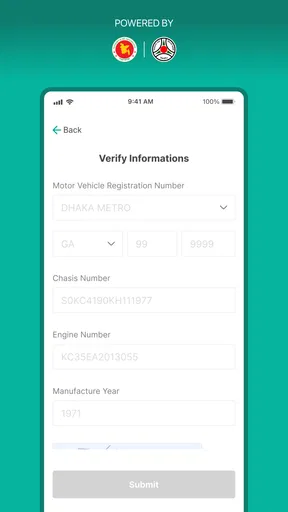
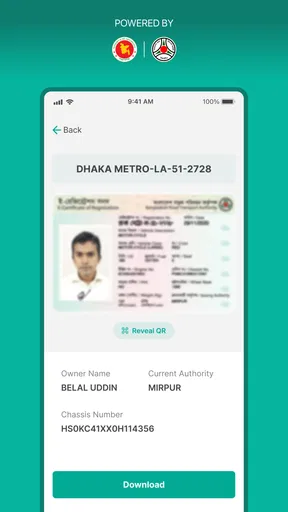
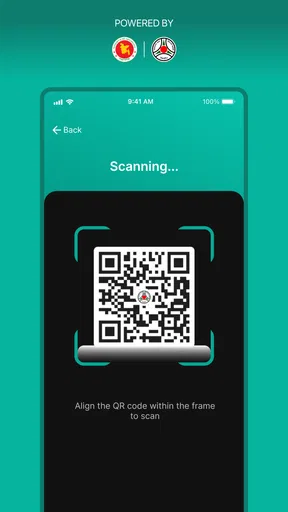
Our Review of BRTA DNP & DRC Checker
 Analysis by Appyee
Checking vehicle paperwork is rarely something I do for fun. Usually, I open a service like BRTA DNP & DRC Checker because I am already dealing with a practical task: confirming whether a digital number plate or digital registration certificate is ready, retrieving an electronic document, or making sure a document can be trusted before I rely on it. That narrow purpose is also the app’s main strength. It is not trying to become a complete driving companion; it focuses on a specific part of vehicle administration.
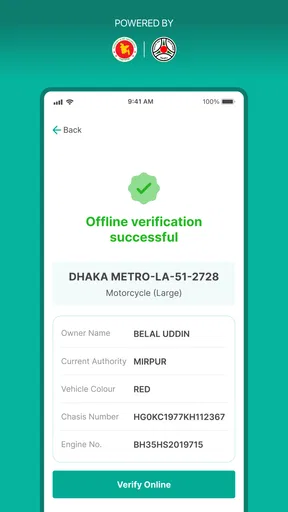
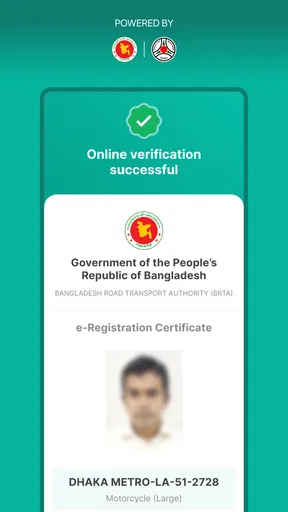
Developed by BRTA ICT, this free Auto & Vehicles app is aimed at people who need a direct way to check DNP or DRC status, download an e-RC, and verify its authenticity. I found the idea more useful than a general vehicle-information app because the workflow is centered on official document handling rather than broad motoring content. The important question is not whether it has a long feature list, but whether it helps me finish a paperwork check without guesswork.
The app is available for Everyone and supports devices running Android 5.1 or later. It has passed the half-million-install mark and holds an average rating of 3.9 from roughly fifteen hundred ratings, which suggests that many people find it useful while also leaving room for occasional friction. Its current version is 1.0.8, so I would keep it updated before assuming a failed check is caused by my phone.
Where people usually get stuck
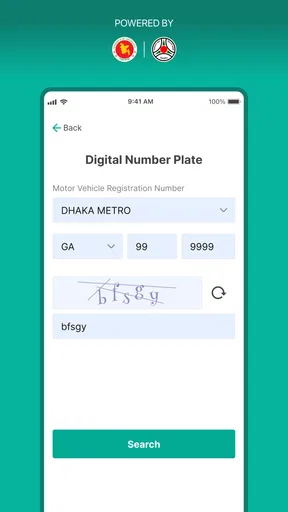
The first obstacle is often not the status result itself but knowing which document or identifier the task actually concerns. DNP and DRC are different parts of the vehicle-registration process, while an e-RC is a downloadable electronic record. If I start by entering information without first identifying whether I am checking a plate status, a registration certificate, or a downloaded document, I can easily end up repeating the wrong action.
My practical advice is to pause before using the keyboard. Look at the paperwork, message, or instruction that brought you to the app and identify the exact reference it asks for. Entering a nearby number from the same document may produce no useful result even when the vehicle information itself is correct. This is a small distinction, but it is one of the most common reasons an official checker feels unreliable.
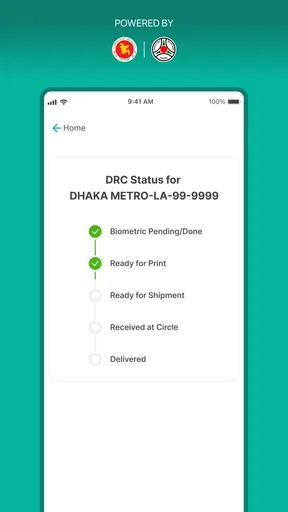
Another point of friction is the difference between a status check and an authenticity check. A status result tells me where a DNP or DRC-related process stands. Authenticity verification serves a different purpose: it helps establish whether an electronic registration document is genuine. I would not treat a successful status search as automatic proof that every copy of a document is authentic, nor would I assume that downloading an e-RC alone completes verification.
There is also a human expectation problem. When I use an official checker, I want an immediate, highly detailed explanation for every outcome. In practice, a result may be brief or may require me to review the information I entered. The app is most valuable when I use it as a focused verification tool, not as a replacement for every possible BRTA support channel.
A realistic example is buying a used vehicle. Before meeting the seller, I might use the app to check the relevant DNP or DRC status and later inspect the e-RC. That gives me a more organized starting point for the conversation. It does not remove the need to compare the document with the vehicle and the seller’s other paperwork, but it can prevent me from relying only on a screenshot or a verbal claim.
Start with the smallest possible check
When a query fails, I avoid changing several things at once. I first re-enter the relevant identifier carefully, checking spaces, punctuation, letter and number confusion, and any leading characters. Then I retry the same operation. Changing the vehicle details, switching between DNP and DRC checks, and attempting a download all at once makes it impossible to know what fixed the problem.
This app rewards a tidy sequence. I begin with the status check that matches my paperwork. If the result is available, I note what it says before moving to the e-RC workflow. If I need authenticity verification, I treat that as its own step rather than assuming that a downloaded file has already been validated. This separation is one of the most useful habits I developed while using the app.
Setup checks that prevent avoidable failures
There is no complicated onboarding that needs to dominate the experience. The important setup work happens around the phone and the information I bring to the app. I make sure the device meets the minimum Android requirement, keep the application on its current version, and use a stable internet connection before beginning a status request or document download.
The connection check matters because a vehicle record can be available while the request still fails during transmission. If the app appears to remain busy, I do not immediately submit the same request repeatedly. I wait briefly, return to the relevant screen, and try once more. Repeated taps can create confusion about whether the first request was accepted or whether the problem is simply a delayed response.
I also prepare the source document before opening the app. If I am working from a printed certificate or a message, I keep it visible and enlarge the text if necessary. Typing from memory is a poor approach for registration information. A single misplaced character can look like a missing record, an unavailable service, or an invalid document when the real issue is just input accuracy.
The best setup is a clean reference document, a current installation, and one deliberate request at a time. That sounds basic, but it makes the result much easier to interpret. It also reduces the temptation to blame the app when the actual problem is an unreadable number or an unstable connection.
What I check before downloading an e-RC
I treat the download as a separate practical task rather than the end of the search. Before starting, I confirm that I am checking the intended vehicle and that the result corresponds to the document I need. After the download, I look for the file on the device using the phone’s normal file or document tools, instead of assuming it will appear in the same place as a browser download.
This is an important everyday distinction. A successful download request and a document that I can locate, open, and present are not always the same experience. If I plan to show the e-RC to another person, I check it while I still have the original context in front of me. That avoids discovering later that I saved the wrong record or cannot find the file when it matters.
I would also avoid treating an electronic copy as a reason to discard the physical paperwork immediately. The app is useful for access and verification, but careful vehicle administration still benefits from keeping relevant records together. In a sale, transfer, inspection, or dispute, having the source documents available gives me a stronger basis for comparison.
Why the official focus helps
Compared with searching the web, asking in a social group, or relying on a third-party vehicle app, this tool has a clearer relationship to the BRTA document workflow. That matters when I need a DNP or DRC status rather than general advice. Search results can be outdated, and informal answers may explain a process without actually checking a particular record.
The trade-off is that a focused official checker may feel less forgiving than a general-purpose app. It is not designed to interpret every situation conversationally or guide me through unrelated vehicle matters. I prefer that narrowness when the job is verification, but someone looking for maintenance reminders, fuel information, route planning, or broad ownership management should choose a different type of app.
Recovering when the workflow breaks
When a check does not work, I use a simple recovery order. First, I confirm the input. Next, I check the connection and try the same request once. Then I close and reopen the app before attempting the operation again. Finally, I make sure the app is updated and that the phone satisfies its Android requirement. These steps are intentionally ordinary because they address the most likely points of failure without inventing a special fix.
If the status check works but the e-RC download does not, I do not immediately repeat the status search. I keep the successful result in mind and focus on the document step. I check whether the download actually completed, whether the file is visible in the device’s document area, and whether the connection remained stable. Separating the stages helps me avoid losing a useful result while troubleshooting the next action.
If the app shows an unexpected result, I compare the entered information character by character with the source document. I also consider whether I selected the correct kind of check. A DNP-related request and a DRC-related request should not be treated as interchangeable simply because both concern the same vehicle. This is a non-obvious but important workflow improvement: the right identifier in the wrong section is still the wrong request.
For an authenticity concern, I preserve the electronic document and the context in which I obtained it. I do not rely on a cropped image sent through a chat if the app can provide the relevant electronic record directly. When another person presents a document, I prefer to perform the check myself rather than accepting a forwarded result without examining the vehicle details.
When repeating the request makes things worse
Repeated attempts can be unhelpful when the issue is temporary connectivity or a delayed response. I have found it better to change one variable at a time and record what happened: which check I selected, which identifier I used, and whether the problem occurred during lookup or download. That small note is especially useful if I need to explain the issue to someone else later.
I also avoid uninstalling the app as my first response. Removing it can erase convenient local access or create another setup step without addressing an incorrect identifier or service-side delay. Restarting the app, checking the network, and confirming the version are safer first moves. If the same problem continues after those checks, it is more reasonable to seek official assistance with the exact error and the step that produced it.
Privacy is another reason to be disciplined. Vehicle registration details are sensitive enough that I would not post screenshots publicly while asking for help. I can describe the general problem without sharing full identifiers. The app’s purpose is verification, so I use it directly rather than sending document images to strangers who claim they can check them.
When the app may not be the cause
Not every failed lookup means the application is broken. The record may not yet be available in the expected state, the entered details may not match the official record, or the service may be temporarily unable to return a response. From my side, the most responsible approach is to distinguish an input problem from a service problem before drawing a conclusion.
A useful test is consistency. If unrelated checks also fail on the same connection, I suspect the network or the device first. If the app opens normally but one particular vehicle reference repeatedly produces an unexpected result, I focus on the document and identifier. If the same careful request fails later as well, I keep the details of the attempt and use the appropriate official support route rather than guessing.
The app should also not be treated as a complete substitute for physical inspection or broader legal due diligence. A status or authenticity result can support a decision, but it does not tell me everything about a vehicle’s mechanical condition, ownership conversation, outstanding obligations, or the accuracy of every paper shown by a seller. For a used-vehicle purchase, I use the checker as one layer in a larger process.
This is where some alternatives are better. A general search engine may be faster for finding procedural explanations. A service desk may be more appropriate when a record needs correction. A file manager may be better for locating a downloaded e-RC after the app has completed its part. None of these replaces the focused check, but each can solve a different part of the overall task.
Who will benefit most
I would recommend this app to vehicle owners who want a direct way to check DNP or DRC status, people preparing to review registration paperwork, and buyers who want an additional official-looking workflow before moving forward. It is also useful for anyone who regularly needs to retrieve an e-RC instead of depending on a paper copy being immediately available.
The app is less suitable for someone expecting a full vehicle-management dashboard or detailed explanations for every administrative situation. It is also not the right tool to use alone when the decision involves a major purchase or a disagreement over ownership. In those cases, the result is helpful evidence to examine, not a complete investigation.
Because it is free, the barrier to trying it is low. Still, free access does not remove the need for careful input. The value comes from using the official workflow correctly, not from pressing a check button and accepting the first result without comparison. I see it as a practical utility that earns its place on a phone when document verification is a recurring need.
My practical verdict
After using BRTA DNP & DRC Checker, I see a focused tool with a sensible purpose and a few predictable points where users can lose time. Its strongest quality is concentration: it brings DNP and DRC status checking, e-RC access, and authenticity verification into a workflow aimed at BRTA vehicle documents. That is more useful than a generic motoring app when the immediate problem is administrative proof.
The experience is best when I prepare the correct reference, choose the matching check, and keep status lookup separate from downloading and authenticity verification. Those habits make the app feel more dependable and also make failures easier to diagnose. The main limitation is that a narrow checker cannot explain or resolve every registration problem, and a failed request may require patience and outside official help.
With a 3.9 average from around fifteen hundred ratings and more than half a million installs, it has clearly reached a substantial audience without presenting itself as a universal solution. I would install it for document-related vehicle tasks, especially before reviewing a used vehicle or needing an electronic registration record. I would not use it as my only source of truth for a purchase, dispute, or legal decision.
My final recommendation is straightforward: if you need BRTA-focused DNP or DRC checking on an Android phone, this free app is worth trying. Keep the source paperwork beside you, enter one identifier carefully, verify the result in the correct workflow, and save the e-RC responsibly. Used that way, it is a practical companion for a specific job rather than an app that promises to solve every vehicle problem.
Verdict
Strengths of BRTA DNP & DRC Checker
- Quickly checks BRTA driving licence and vehicle registration details.
- Useful for verifying document information before buying a used vehicle.
- Simple interface with clearly separated DNP and DRC checking options.
- Reduces the need to visit a BRTA office for basic status checks.
- Helpful reference tool for drivers in Bangladesh.
Limitations of BRTA DNP & DRC Checker
- Requires accurate document numbers to return useful results.
- Service availability depends on BRTA system connectivity.
- May not provide complete details for every document type.
- Some users may find the verification process unclear at first.
- Unofficial app status should be checked before submitting sensitive data.
Similar Picks in This Category
View All
Android Auto
Google LLC4.1

maxim — order a taxi & food
PT. SITO4.7

Штрафы ГИБДД: проверка с фото
Pays LLC – Штрафы ГИБДД4.7

Номерограм – проверка авто
Авто Ассист4.8

Дром Авто
Дром4.9

Frequently Asked Questions
What is BRTA DNP & DRC Checker used for?
BRTA DNP & DRC Checker is designed to help users check information related to vehicle registration documents and digital number plates in Bangladesh. It can be useful when verifying whether an application, registration record, or related service status is available in the BRTA system. The app should be treated as an information and checking tool, not as a replacement for official BRTA offices or government-issued documents.
Who can use the BRTA DNP & DRC Checker app?
The app is mainly intended for vehicle owners, drivers, applicants waiting for a Digital Registration Certificate (DRC), and people checking the status of a Digital Number Plate (DNP) in Bangladesh. You may need accurate vehicle or registration details to obtain useful results. Because the information depends on official records, users should enter data carefully and confirm important details through BRTA’s official channels.
What information is required to check a DNP or DRC status?
The exact information requested may vary depending on the checking option available in the app, but users may be asked for details such as a vehicle registration number, application information, or other identifying data connected with the BRTA record. Enter the details exactly as shown on your documents. Incorrect spelling, number formatting, or incomplete information can produce an unsuccessful or inaccurate search.
Is the information shown by BRTA DNP & DRC Checker official and reliable?
The app may display information obtained from or connected with BRTA-related records, but users should not assume that every result is a legally valid document or final confirmation. Online services can experience delays, maintenance, outdated records, or technical errors. For ownership, registration, legal compliance, or payment decisions, compare the result with your original documents and verify it directly with BRTA.
Is BRTA DNP & DRC Checker free, and is it safe to download?
Availability, pricing, advertisements, and permissions can depend on the version and platform from which the app is downloaded. Before installing, review the developer information, requested permissions, privacy policy, and user feedback. Avoid unofficial modified versions that request unnecessary access. Do not share sensitive registration details with unknown parties, and use official BRTA services whenever the app directs you to complete an important government procedure.
